A glimpse is where looking starts. Understanding begins when a model knows what deserves a second look.
Glimpse is a new category of visual thinking model: a system that reasons about the physical world from what it sees. Glimpse follows objects in motion and across changing viewpoints, understands how parts fit together, and connects an observation to what happens next. That understanding matters in robotics, scientific discovery, and the creative industries.
Compared to existing frontier large language models, Glimpse pushes furthest on bringing visual representations into the reasoning process itself. It can reason in visual space, revisiting and refining internal visual representations as thinking unfolds, and is more grounded, learning to reason about objects and their spatial relationships. As an agent, Glimpse is also trained end-to-end to use multimodal tools that write code, transform images, and watch videos; and Glimpse can spawn and coordinate subagents that exchange text, visual artifacts, and internal representations to solve a shared problem. Together, these capabilities let Glimpse inspect a problem and revise its interpretation as it reasons.
On multimodal benchmarks, Glimpse attains frontier-level performance at the level of (and sometimes exceeding) GPT-6 Astra and Claude Opus 5.5 while being a substantially smaller and cheaper model. We developed Glimpse as a small team with only a few hundred GPUs, post-trained on an open weights base model. Glimpse is available through API and our chat UI today.
Model results
Glimpse exceeds Astra on four evaluations spanning scientific chart reasoning, open-vocabulary counting, short-form video captioning, and manipulation-event understanding, and matches it on embodied reasoning. These capabilities support applications from analyzing laboratory data and tagging social-media videos to identifying completed actions in robot footage.
More generally, Glimpse is competitive across a suite of multimodal benchmarks. Input tokens cost $0.60 per million and output tokens $3.00 per million: both rates are 94% lower than GPT-6 Astra’s, 85% lower than Claude Opus 5.5’s, 70% lower than GPT-6.1 Sol’s, and 20% lower than Gemini 3.8 Flash’s introductory rates.
| Capability | Evaluation | Glimpse | GPT-6 Astra | GPT-6.1 Sol | Opus 5.5 | Gemini 3.8 Flash |
|---|---|---|---|---|---|---|
| Input priceUSD / 1M tokens, uncached | $0.60 | $10.00 | $2.00 | $4.00 | $0.75introductory | |
| Output priceUSD / 1M tokens | $3.00 | $50.00 | $10.00 | $20.00 | $3.75introductory | |
| Robotics | WGO BenchEnd-to-end manipulation events | 42.70 | 39.42 | 38.91 | 12.34 | 33.99 |
| Robotics | ERQAEmbodied spatial reasoning · accuracy | 83.75 | 83.75 | 82.45 | 82.20 | 81.20 |
| Visual perception | BabyVisionFine-grained visual reasoning | 94.33 | 97.68 | 97.16 | — | 83.25 |
| Visual perception | HSSScene understanding · image + video | 46.36 | 53.6 | 46.6 | 49.81 | 41.6 |
| Scientific reasoning | CharXiv-RScientific chart reasoning | 92.90 | 92.10 | 92.60 | 93.40 | 91.80 |
| Video captioning | UGC-VideoCapShort-form video captioning | 82.66 | 80.32 | 80.41 | 76.35 | 78.33 |
| Video captioning | DREAM-1KDense video captioning | 76.04 | 79.05 | 77.93 | 72.05 | 70.00 |
| Temporal reasoning | TOMATOFine-grained temporal reasoning | 93.60 | 96.02 | 89.02 | 72.44 | 83.02 |
| Temporal reasoning | Video-MME v2 with subtitlesGrouped rubric score | 56.68 | 64.06 | 65.27 | — | 59.58 |
| Temporal reasoning | E.T. BenchEvent understanding | 63.55 | — | 59.79 | — | 63.45 |
| Counting | FSC-147Open-vocabulary counting | 83.36 | 82.02 | 82.69 | 73.78 | 67.06 |
| Counting | CountQAProduct image counting | 82.66 | 86.42 | 86.42 | 82.20 | 81.09 |
Unless otherwise noted, all model results use the highest thinking effort and native agent harness: Glimpse max; GPT-6 Astra max + Code Interpreter; GPT-6.1 Sol max + Code Interpreter; Opus 5.5 max + Code Interpreter; and Gemini 3.8 Flash high + Code Interpreter for image and Gemini 3.8 Flash high + Video Agent for video. For video evals, GPT-6.1 Sol and Opus 5.5 use high + Code Interpreter, except Sol Video-MME v2 which uses max + Code Interpreter; max-effort results are not available for the other video evaluations. HSS includes paper-reported results.
What visual thinking changes
The following examples illustrate different modalities of visual thinking — from following an event, to predicting an outcome based on the physics, to connecting an action to its effect, to counting objects precisely. These worked examples are meant to give you a glimpse into what simple visual thinking patterns look like, and how they can capture chains of reasoning more efficiently and accurately than text-based reasoning alone. As you chat with Glimpse, our platform shows the model’s visual scratch space as it reasons: it will zoom into a region, watch a short interval at a denser frame rate, or track one feature across time — and you too will start to build intuition around what kinds of problems visual thinking can unlock.
-
01 · Follow the world through time
Follow the event, not a sample of frames
Follow a slowing train
Change in speed. A real source clip and correct model output: follow one feature through time, compare displacement, and verify the trend near the stop. “What is the pattern of the train's speed?”
C. Decelerating.
- Locate The train enters the frame at about 2.2 seconds; use the same visible window edge as the reference point.
- Compare From 2.2–3.0 seconds the reference point moves a large distance between nearby observations and carries visible motion blur.
- Rewatch From 4.5–4.9 seconds the displacement contracts sharply; from 4.9–5.13 seconds it moves only a few pixels.
- Answer Distance per equal time interval decreases as the train reaches the platform.
Recorded model output. Timestamps, the observed displacement pattern, and the answer are preserved; the evidence trace is condensed for publication.
Follow two birds through a camera move
Identity through motion. A real clip and trace: keep both birds distinct, test the edit hypothesis, and recover the event sequence across the camera move. “Describe the video completely, including subjects, actions, timing, shot structure, and uncertain details.”
Task summary · Required answer: An open-ended, detailed video caption. Describe the birds’ actions and their order, including what happens during the camera move. No candidate answers are supplied.
0.00–1.75 fly and circle → 1.75–4.00 perch and call → 4.00–5.10 take off during a continuous pan → 5.10–6.13 enter the glowing arch
- Map Cover all 6.13 seconds, then watch at 8 fps: two blue birds circle a brass door handle, land, face each other, and take off left.
- Inspect Zoom 2.4–4.0 seconds: both pairs of feet grip the lever; the leading bird carries a magenta strap and the second a pale-green head covering.
- Resolve Rewatch 4.3–5.2 seconds near 14 fps. Intermediate wall positions show a continuous pan, not a hard cut.
- Verify At 5.25–6.05 seconds the first bird enters the lit arch; the second pauses at the sill, then follows. Both remain visible in the final sampled frame.
Recorded evaluation run. The published trace preserves the model's timestamps, competing cut-versus-pan hypothesis, targeted rewatches, and final event order while condensing the dense caption.
The two recorded traces above show different ways to resolve uncertainty: track one stable feature across time to judge speed, or revisit a short ambiguous transition at a denser sampling rate. In the second trace, the model moves from an 8 fps inspection to roughly 14 fps over the 0.9-second interval that distinguishes a pan from a cut. The extra inspection is concentrated on the moment that determines the answer.
In the train clip, the model follows a window edge from the train’s entrance at about 2.2 seconds to its near-stop at 5.13. The edge travels progressively less distance between observations. In the bird clip, the camera swings as two birds leave a door handle; the model checks the intervening wall positions to determine whether the shot continues through the movement.
-
02 · Predict what happens next
What happens if the grip slips?
Read the contact, predict the consequence
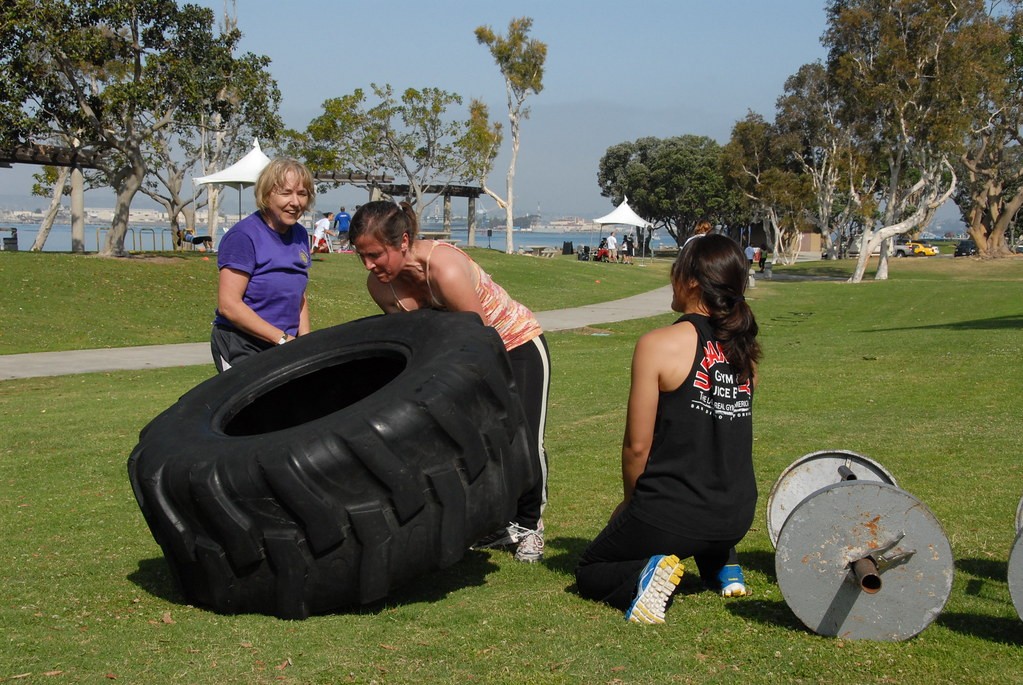
Physical consequence. Identify the support, locate the pivot, and consider who is in the path of the falling edge. “If the woman in the striped top suddenly loses her grip before the tire becomes upright, which woman is most immediately at risk of being struck, and how would the tire move to create that risk?”
Required answer: Identify which woman is at risk and explain how the tire would move toward her. This is an open-ended question, with no supplied answer choices.
Most immediate risk: the woman in the striped top.
- Locate The tire’s lower edge is still in contact with the grass; its raised side has not crossed the upright balance point.
- Model If support disappears, gravity rotates the elevated side back down around the grounded edge.
- Project The returning edge sweeps toward the striped-shirt woman, who is leaning over the raised side.
Source photograph and reviewed reference answer. The explanation identifies the visible support and projected motion; it is not a recorded simulation or model trace.
The reviewed reference answer follows the tire’s motion: the grounded edge acts as a pivot, and gravity brings the raised edge back down toward the striped-shirt woman. Her position puts her most immediately in its path. This is a qualitative prediction from the photograph; no trajectory or impact force has been simulated.
Three women are lifting a tractor tire. Its lower edge rests on the grass, while the woman in the striped top leans over the raised edge. The question asks what would happen if she lost her grip before the tire reached an upright position.
-
03 · Understand cause and effect
Connect an action to what it changes
Action changes the path
From movement to mechanism. The operator moves the lever; the connected track points change position. The clip and reference answer illustrate the effect of the action. Direct action generation remains future work. “What happened when woman placed the circular rail from her right to left?”
Required answer: Explain the physical effect of moving the switch. This is an open-ended question, with no supplied answer choices.
The switch changes the direction of the track points.
- Locate Find the operator and the switch mechanism beside the locomotive.
- Follow During 15–20 seconds of the source clip, she moves the switch across her body.
- Connect The action repositions the track points: the visible hand movement changes the railway’s physical path.
Source footage and reviewed reference answer, not a recorded Glimpse trace or generated control sequence. This excerpt covers source seconds 12–26.
The recorded robot-video inspection makes a related distinction in time: picking the marker out of the pot ends at 8.9 seconds; placing it on the table and releasing it ends at 14.085. Its output contains those two completed events. We are developing direct action outputs as a next step toward using this kind of scene understanding to control robots.
During seconds 15–20 of the railway source clip, the operator pulls the switch from her right to her left. The lever is connected to the track points. The reviewed reference answer follows that connection: moving the lever changes the points’ position and the path through the track.
-
04 · See precisely
Count the right objects
Count the open pliers
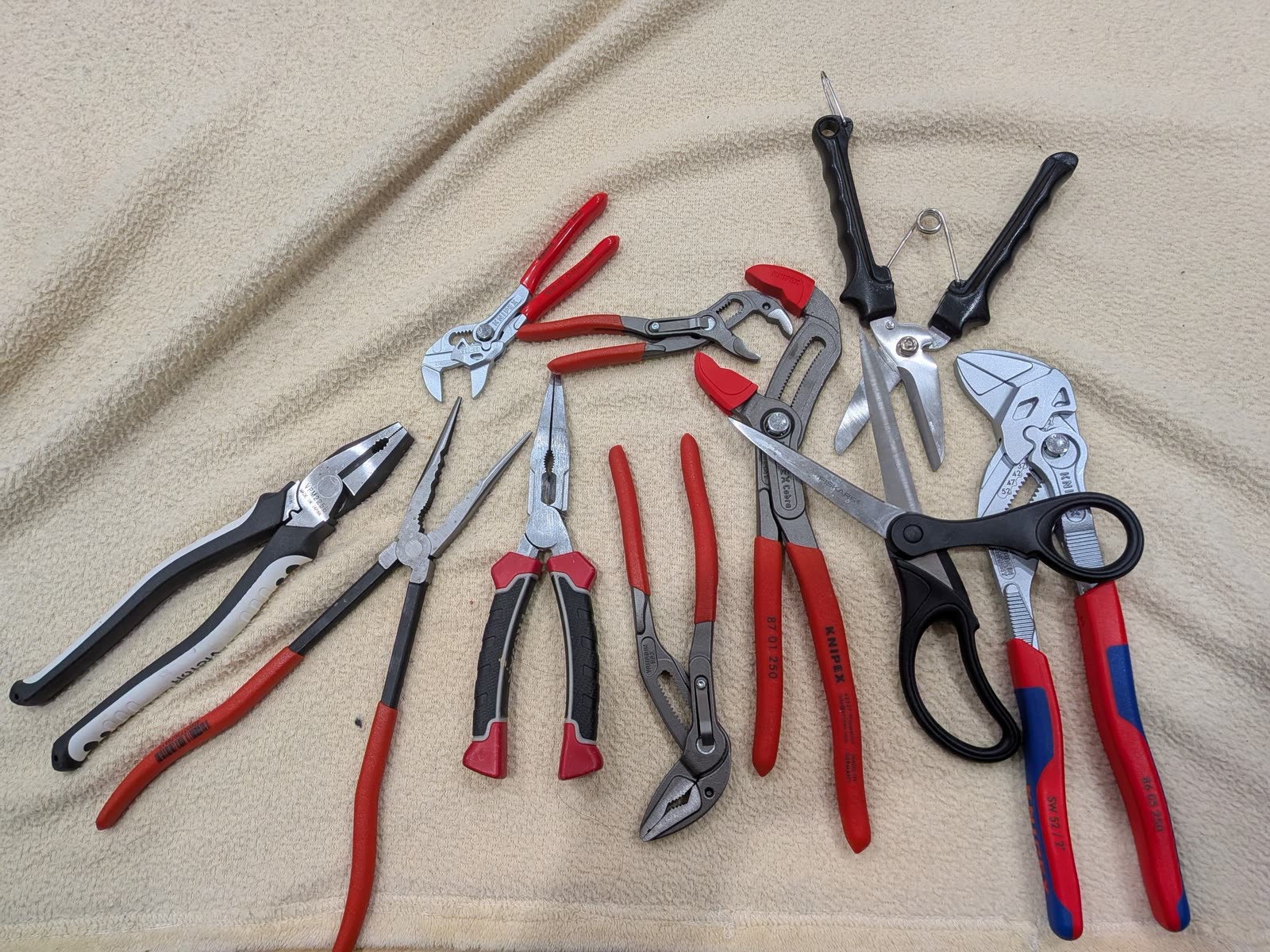
Count by identity and state. An original photograph exposes a failure that ordinary counting hides: the target category is easy, but its state and lookalikes must remain separate. “How many open pliers are there? Return an integer.”
Required answer: One integer. Count only open pliers; there are no multiple-choice options.
4
- Define The target is not every hand tool and not every pair of pliers. It is pliers whose handles and jaws are visibly open.
- Separate Closed pliers are category matches in the wrong state. Scissors are lookalikes in the wrong category.
- Verify Revisit each candidate against both constraints—tool identity and open state—before adding it to the count.
- Reference The reviewed reference count is four.
Original photograph and reviewed reference answer. The steps explain the visual distinctions in the task; they are not a recorded model trace.
In the photograph above, the question asks for open pliers. A closed pair has the right tool shape but does not qualify; scissors have two handles and a hinge but belong to a different category. Checking the handles and jaws of each candidate gives the reviewed reference count: four.
Counting is a fundamental perception ability: identifying the set of objects within a scene. In a crowded collection, that means keeping adjacent objects separate, distinguishing them from lookalikes, and checking which ones meet the question’s criteria.
What Glimpse can do
The worked examples above illustrated how visual thinking works in theory. The below examples illustrate how Glimpse is applied in practice to a range of real tasks, from robotics (synthetic data generation for training, System 2 planning for a VLA model), to dense captioning over short form videos, to precise video counting of a group of puppies in a yard or equipment on a construction site, to reliably solving simple visual reasoning puzzles that a child can do, but have proven so challenging for many of today’s frontier models.
A foundation model for robotics — from synthetic data generation to high-level planning
Labeling and segmenting teleoperation data
Planning and checking the work of a VLA model
Asked to “put the cream cheese in the bowl, then put the bowl up on top of the cabinet,” each model acts as the planner for the same vision-language-action policy, π0.5 from Physical Intelligence. The planner breaks the request into steps, checks the robot's cameras while the arm works, and decides when a step is done and what comes next. Both planners complete the task. Glimpse's planning costs $0.035 for the episode; Astra's costs $0.249.
Mapping the world’s video archives
Dense captioning focused on fine-grained movements — a street performance in Havana
Dense captioning focused on social and emotional dynamics — a couple and a packed bag
In both videos, Glimpse is able to capture fine-grained visual details and subtle inferences that both Gemini 3.8 Flash and GPT 6.1 Sol miss.
Counting — from your yard to the general contractor’s
Count and track — every puppy, counted once
On the job site — how many construction vehicles are in the yard?
Recorded Glimpse session in the Elorian platform, answer shown as returned.
Advanced visual reasoning
Visual puzzles — mazes and spot-the-difference
Humanity's Sixth Sense — can a model see what happens next?
The motion that plays after each answer is generated from the still by Seedance 2.5 to illustrate the benchmark's reference answer. No model saw it.
Toward models that understand visual worlds
Glimpse is a preview into the capabilities we are looking to unlock at Elorian. We believe building the full stack across systems, data, model architecture, and training — from the ground up for multimodal intelligence — can unlock AGI in the physical world. Models must be able to reconstruct a scene, predict what happens when something moves, and use that understanding to guide the next actions. Beyond robotics, engineering, and defense applications, these capabilities can help creators produce and edit video, technology companies search and organize online media, and game developers build and test interactive environments.
We are working toward these goals through multimodal-native pretraining, models that both understand and generate, and direct action outputs for robots. Glimpse’s visual understanding capabilities are an early step; calibrated reconstruction and robot control remain work ahead.
Glimpse is available through an API and an interactive chat interface. Try Glimpse free on the Elorian platform.